
Who sits where at your wedding?
Paste your guest list, describe your families the way you would tell a friend, and get a seating chart where every rule holds. Then print the sign, the cards and a brief for your coordinator.
- Free to plan for any number of guests
- No sign-up, your list stays in your browser
- $29 once, only when you print
Works with lists from Google SheetsExcelZolaThe KnotJoy
One guest per row, straight from Google Sheets or Excel. Or drop a CSV or Excel file here.
From Zola, The Knot or Joy
- Zola: open your guest list, export it as a spreadsheet, then drop the file here.
- The Knot: open the guest list manager, download the list, then drop the file here.
- Joy: open your guest list, export it as CSV, then drop the file here.
- We read the column names, so party, meal and age columns come across. Download a blank template.
Guests and tables
We set up your tables from the list. Change them only if you need to.
| Name | Party | Meal | Age |
|---|
A party sits at one table. Give two guests the same party to keep them together.
Room and tablesRoom layout, table shape, seats, your table
Tell us about your families
Write it like you would tell a friend. We turn it into rules you can check.
Part of the wedding pass. We send this text and your guest names once to a language model to find the rules. We do not keep the text. You confirm every rule. Rules by hand below are free.
Seating rules
No rules yet. Rules are optional: parties always sit together.
Add a rule by handPick two guests and how they should sit
Kids tableSeat children together, by age
Your chart
Every rule is checked again after each move.
How each rule was metTables and seats for every rule
Tap a guest, then tap another guest or a free seat to swap. On a computer you can drag names. Lock a guest to keep them at their table when you seat again.
Your print files
Every file uses your guests and your chart. Previews are free and watermarked.
Sizes and paperSign size, A to Z order, card paper
Wedding pass
$29 once
- Every file, every size and design
- Late changes for 12 months
- No watermark. Planning stays free.
Wedding pass active. No watermark.
Free for everyone
Late changesSomeone can't come, or the list changed
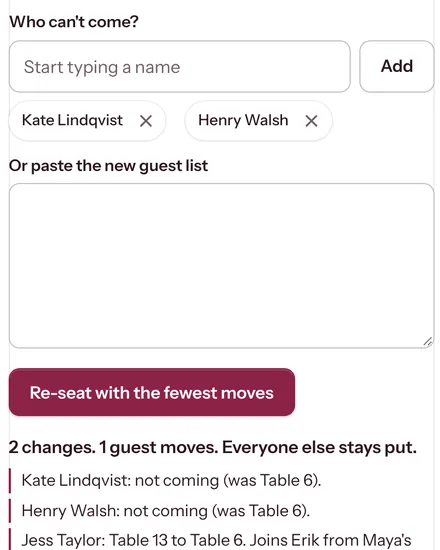
Paste your new guest list or name who can't come. Everyone else keeps their seat; we move as few people as we can and print only what changed.
Guests
Paste or drop your list. Couples and families stay together.
Family
Describe who can't sit together, in your own words. You confirm every rule.
Chart
Everyone seated in seconds, every rule checked. Swap anyone with two taps.
Print
A sign guests can read, escort and place cards, table numbers and a day-of brief.
Your tables appear here. Seat everyone to see who sits where.
No sign-upSaved on this deviceTen minutes, start to finish

How to make a wedding seating chart in three steps
You need your guest list and about ten minutes. Planning is free for any number of guests, and nothing leaves your browser until you ask it to.
-
1Paste the list once
Copy the rows from Google Sheets or Excel, or drop the file you exported from Zola, The Knot or Joy. We find the name, party, meal and age columns and keep each household together.
-
2Describe your families
Write it the way you would tell a friend. A language model turns each sentence into a rule and shows you the words it came from. You keep or delete each one.
-
3Seat everyone, then print
The solver seats every guest so each hard rule holds and places the tables in the room. Every table explains itself. Then print the sign, the cards and the day-of brief.
What the seating chart maker does
Say it the way you would tell a friend
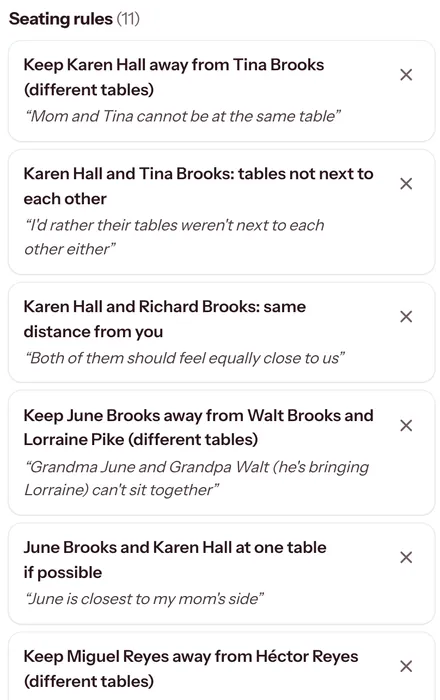
“Mom and Tina can’t share a table, and both should feel equally close to us.” Instead of a rule builder, the tool reads your notes and writes the rules for you.
- Each rule shows the sentence it came from, so you can check it in a second.
- Keep apart, same table, side by side, near the door, equally close to you.
- You keep or delete every rule. The model never picks a seat.
- Comes with the wedding pass. The sample wedding shows how it works, and rules by hand are free.
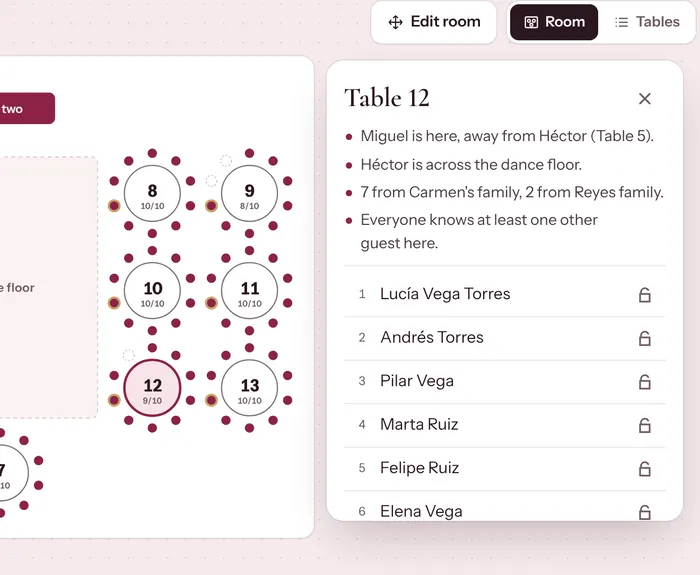
Every table explains itself
Tap a table to see who sits there and why. Table 12 in the sample says it plainly: Miguel is here, away from his brother Héctor at table 5. Nothing is a black box, so you can show your mother exactly why she sits where she does.
- Swap two guests with two taps, or drag names on a computer.
- Lock anyone you want to keep in place, then seat everyone again.
- Every hard rule is checked again after each move.
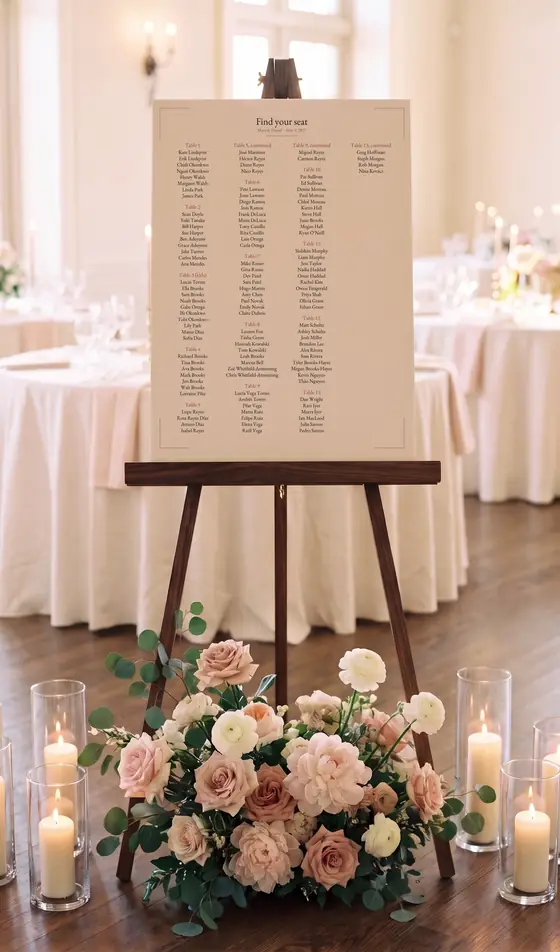
Print files that match, from one chart
A name is never typed twice, so a late change updates every file. You see each file with your own guests, watermarked, before you pay.
- Seating sign by table or A to Z, from 18 x 24 in to A1, names never below 24 pt.
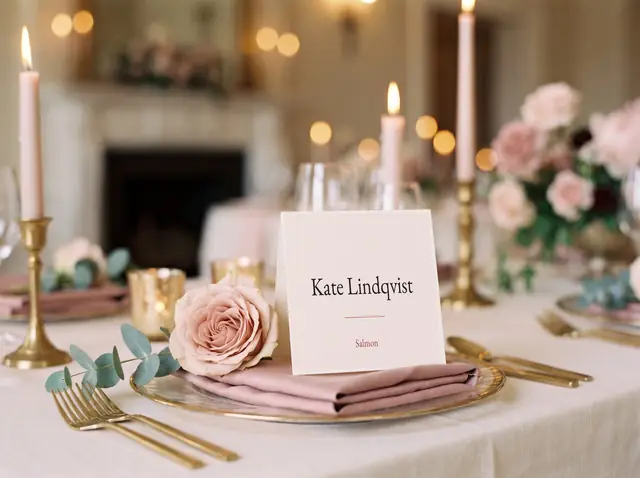
- Escort cards, place cards with meals and allergies, and table numbers.
- A day-of brief for your coordinator and caterer. Six matching designs.
Sizes, paper and what each file containsSix files, Avery layouts, bleed and cut marks
| File | What it is | Plan |
|---|---|---|
| Seating sign | By table or A to Z by first or last name. 18 x 24 in, 24 x 36 in, A2 or A1, vector PDF with 0.125 in bleed. Names never go below 24 pt; if they would, we suggest the next size up. | Wedding pass |
| Escort cards | Name and table, 10 per sheet on the 2 x 3.5 in business card layout (Avery 5371), Letter or A4, with cut marks. | Wedding pass |
| Place cards | Tent cards with the guest's meal and any allergy, 4 per sheet (Avery 5302), fold marks included. | Wedding pass |
| Table numbers | One 5 x 7 in card per table in the same design. | Wedding pass |
| Day-of brief | The room map with seat 1 marked, a watch list from your rules, a seat by seat meal sheet, meal totals with vendor meals, the escort card set-out order and the free seats. | Wedding pass |
| Caterer sheet, Excel, CSV | Seat by seat meals and your full chart as a spreadsheet. | Free |
Late changes without starting over
Three guests cancel the week before. Type their names or paste the new list. Everyone else keeps their seat, and only the files that changed need printing again.
- Re-seats with the fewest moves, and tells you who moved.
- Changes and reprints are covered for 12 months.
A real test: 120 guests and a lot of family history
Our sample wedding is made up, but its problems are the ones couples write to us about. The bride's parents are divorced and remarried. The groom's father and uncle have not spoken in five years. Grandma Lupe uses a wheelchair and speaks mostly Spanish. Two guests dated last year. Ten children are under 12, and one has a nut allergy.
From one paragraph of notes the tool finds the rules and seats everyone: the two mothers on opposite sides of the dance floor, both parents' tables equally close to the couple, and Lupe at the table nearest the door with Tía Rosa beside her.
Plan for free. Pay once when you print.
No subscription and no account to plan. The Wedding pass covers one wedding, with every file and every reprint.
Free
$0for any number of guests
The whole seating plan, for every guest and every rule.
- Guest list import from any spreadsheet
- Seating rules by hand
- Seating solver and room map
- Swap, lock and re-seat
- Caterer sheet, Excel and CSV
Wedding pass Print files
$29once per wedding
Everything in Free, plus the files you hand to the printer and the venue.
- Seating sign in four sizes, by table or A to Z
- Escort cards, place cards and table numbers
- Rules read from your own notes
- Day-of brief for your coordinator
- Six matching designs, no watermark
- Late changes and reprints for 12 months
You see every file with your own guests before you pay. Details on the pricing page.
What the solver guarantees, and what the AI never decides
The language model only reads your notes and proposes rules, each with the sentence it came from. It never picks a table, a seat or a meal. Seats come from a solver that treats your rules in two kinds. More on the method page.
Hard rules always hold
A separate checker tests every one of them again after each change, and tells you in a plain sentence when a rule cannot be met.
- Table size
- Parties together
- Keep apart
- Same table
- Side by side
- Locked guests
- Kids table
Wishes are met when they can be
Room rules are relations, never distances, because the map is a plan of your tables, not your venue to scale.
- Groups together
- Nobody alone with strangers
- Balanced tables
- Parents near you
- Mirror tables
- Door table
Hard family situations
Divorced and remarried parents, feuding siblings, exes: our guide to seating divorced parents at a wedding works through them with the sample wedding. If a head table would force a choice between parents, a sweetheart table often solves it.
Starting from a spreadsheet
Grab the free seating chart template for Excel or Google Sheets, or read how to import your guest list from Zola, The Knot or Joy.
Questions couples ask
Something else? Write to michael@1000ventures.io.
How do I make a wedding seating chart?
Is this wedding seating chart maker free?
How does it handle divorced parents and family feuds?
Does the AI decide where my guests sit?
What happens to my guest list and my notes?
Can I import my guest list from Zola, The Knot or Joy?
What size should a wedding seating sign be?
What if guests cancel a few days before the wedding?
Paste your list and see everyone seated
Free to plan, no sign-up. Your list stays in your browser.